 Scenic Drive — an iOS app for Tesla owners · built on Tesla’s official Fleet API
The coast road at golden hour.
Your Tesla takes it — one tap.
Hand-picked scenic drives — passes and coast roads traced point by point, dense enough that the car takes the road we curated, not the fast bypass. Pick one, tap once, and your Tesla follows it the whole way. Your own routes — any GPX or a Google Maps link — ride the same engine.
A real iOS app
Your scenic routes, one tap from the car.
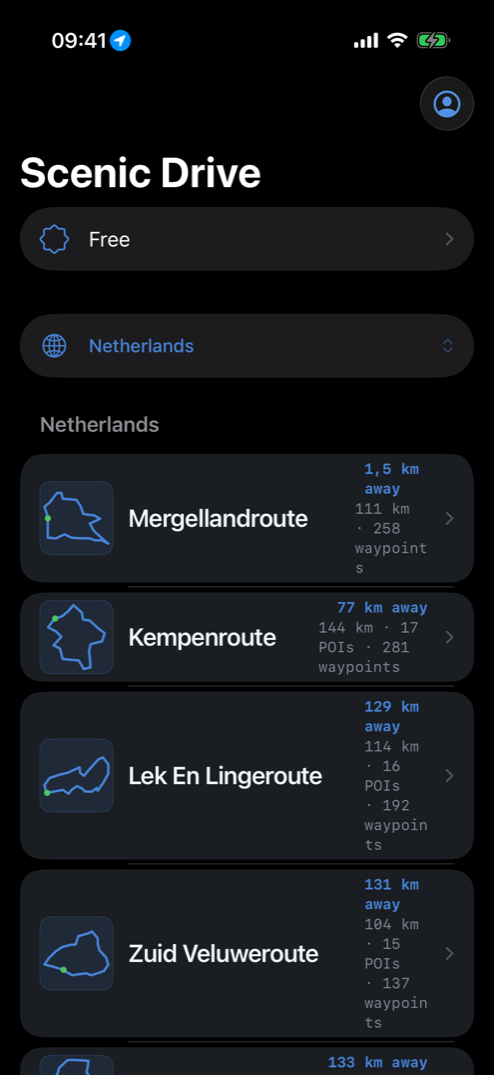
The real catalog — live today.
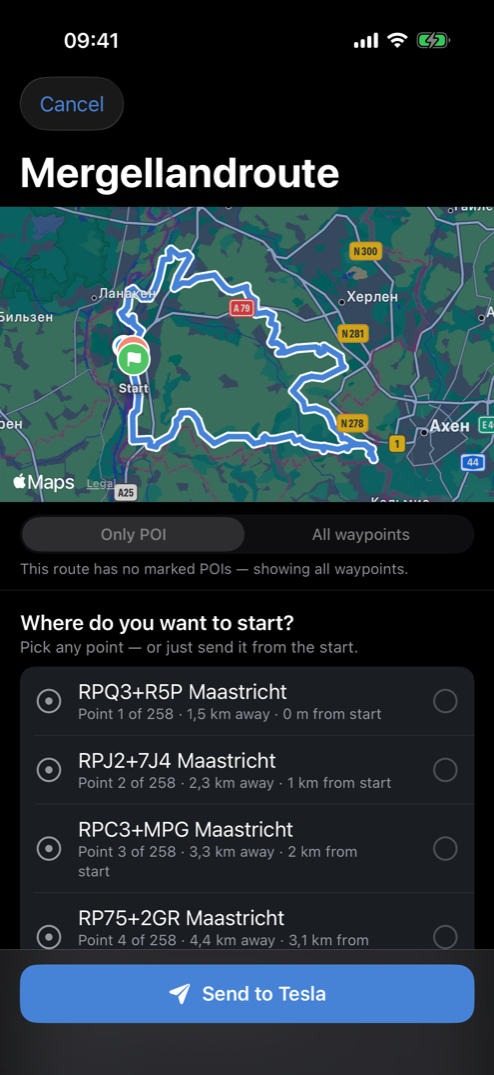
The whole route — 258 points, sent at once.
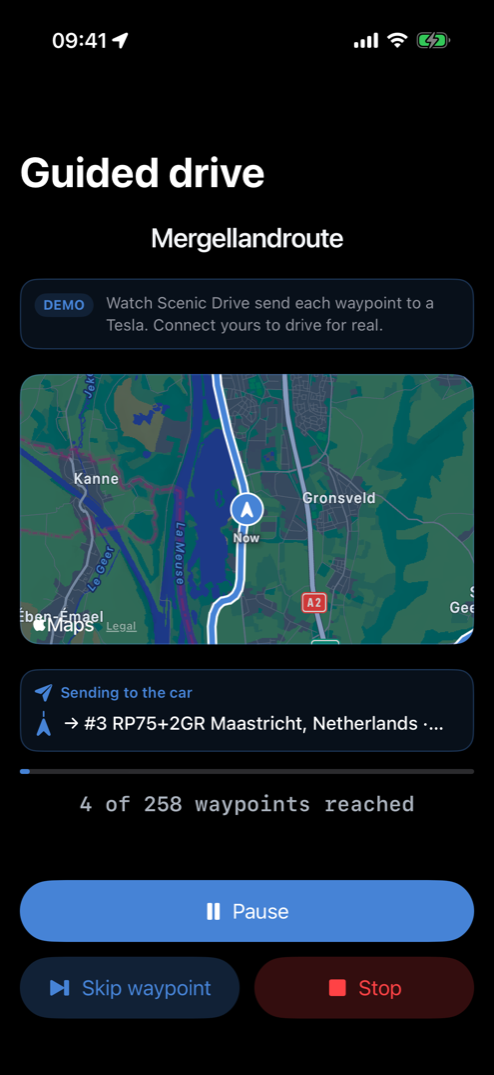
It advances point by point — you just drive.
What Tesla owners say
You know the drive you want.
Your Tesla can’t follow it.
«When the car reaches the first waypoint it just stops… I can find no ‘continue trip’ button in the UI.» — drtimhill, Tesla Motors Club, 2022
«There is no way to do that. The best you can send the Tesla navigation is a destination point.» — GtiMart, Tesla Motors Club, on GPX routes, 2023
«I have been wishing for this for 20 years. I have never had a car that could save a favorite route, only a favorite destination.» — Bigriver, Tesla Owners Online, 2025
«I keep having to fight FSD, disengaging, making turns manually, then reengaging FSD many times.» — Aerospace2061, Cybertruck Owners Club, 2025
So most weekends the fast road wins, and the drive you bought this car for gets skipped — not because you changed your mind, but because the car won’t follow it.
How it works
Here’s the fix.
- Send it once — one tap hands your Tesla the whole route, every point in order, with no waypoints to type on the screen.
- Routes with hundreds of points — where the built-in nav forces 8 hand-typed mandatory stops. Bring a GPX, paste a Google Maps link, or pick a curated drive.
- Your Tesla follows the exact road you chose — turn by turn, every stop, the whole way.
- You never touch the screen again — the app advances the navigation point by point as you approach.
- Stop only where you want — the car glides through every other point. No pulling over, no «continue» button, no deleting stops on the move.
- Your library remembers — save the drives you love and send any of them again in one tap.
258 waypoints in one tap.
What you get
Your library of drives — grows as you save the ones you love.
Save the ones you love, keep them organised, and send any of them to the car in a tap — the exact roads, the exact stops you chose.
Got your own route already? Bring it — any GPX or a Google Maps link goes to the car the same way. See how it works →
Tesla integration
Straight to the car,
through Tesla’s official Fleet API.
Sign in with your Tesla account — official OAuth, the same flow Tesla’s own partners use. We never see your password.
A virtual key pairs the app to your car — you approve it once, on your terms, and can revoke it any time from the car.
The route lands on the car’s own navigation — no cable, no browser tab in the car, no screen mirroring.
Your tokens stay encrypted on our servers — never in the app’s web pages, never sold, deleted when you delete your account.
The drive you’ve been missing
Remember why you bought the car.
Now take that drive.
The coast road at golden hour. The mountain pass you keep meaning to take. This time you just enjoy the road you chose — the whole way through — instead of re-typing it into a screen.
I drive a Tesla. I kept planning beautiful weekend routes — then spent the whole drive fighting the screen instead of looking out the window. So I built the thing I wanted: send the route once, and the car follows it. I send my own routes this way now.
Get the app
Ready to stop typing waypoints into a touchscreen?
The app is running today — the screenshot above is the live build, and the engine behind it has already guided a real Tesla on real roads. Leave one email and we’ll send you the App Store link.
Founder’s discount, locked to this email
Just your email, to tell you when it’s on the App Store. No trackers, never sold, deleted on request — scenic.drive.app@gmail.com.
Do you drive a Tesla?
Which model?
How do you plan a scenic drive today?
You’re in. Get the app.
Leave one email — we’ll send you the App Store link. Founder’s discount, locked to this email.
Done — we’ll email you your App Store link.